Pre-releaseFree and open source, AGPL-3.0

Your whole newsletter,
on your own Cloudflare account.

Write posts, send them, publish them on your own website, grow your list and sell paid subscriptions. Your subscribers live in your own database, and Swarm takes 0% of what readers pay you.

Install from a terminal
git clone https://github.com/jntegz/swarm-newsletter.git swarm
cd swarm && pnpm install
pnpm swarm

Needs a Cloudflare account with a domain, Node.js 22 and an email service. What you need

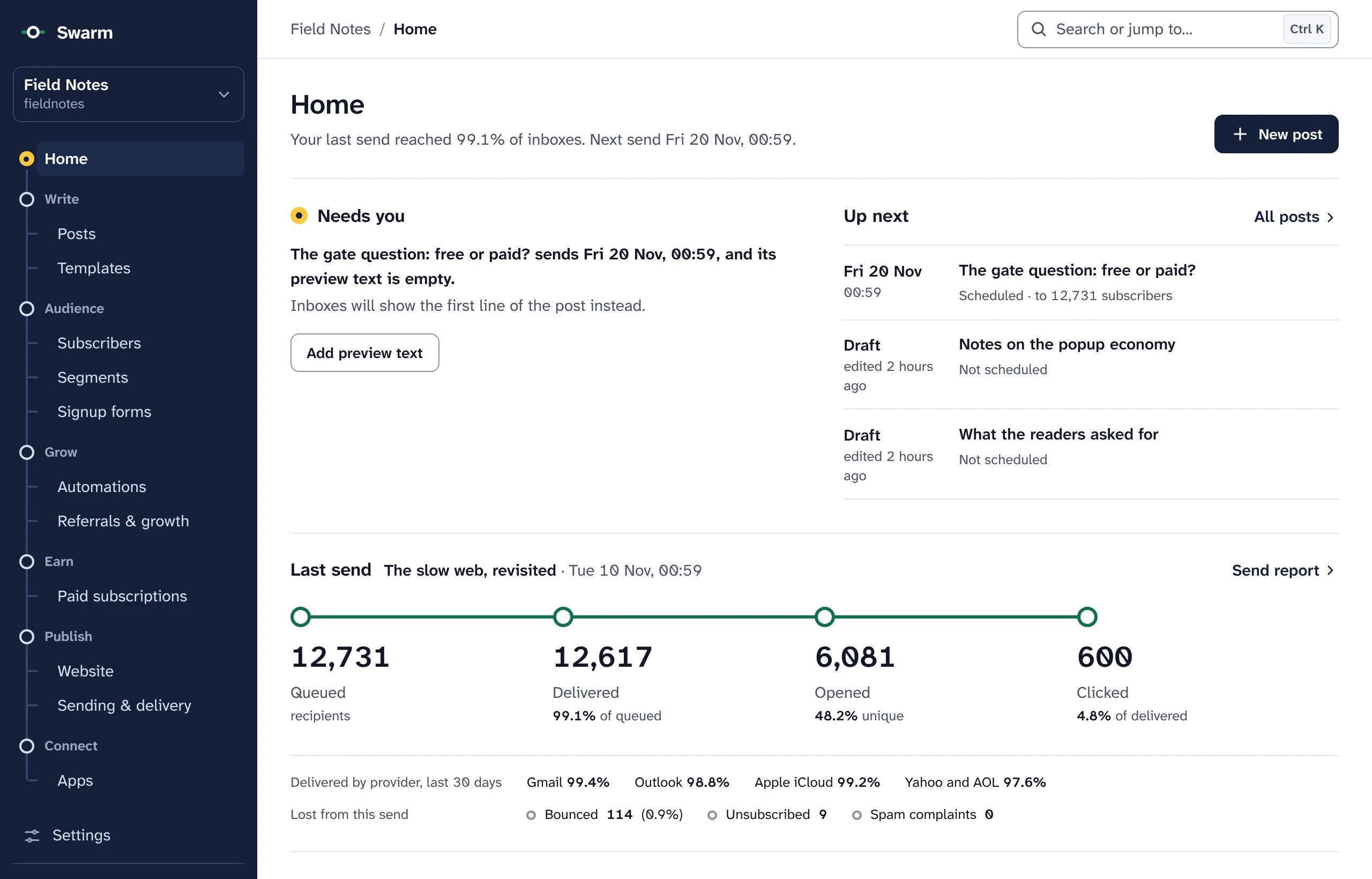
The Swarm dashboard Home for a publication called Field Notes. A dark navigation rail drawn as a transit line lists Home, Posts, Templates, Subscribers, Segments, Signup forms, Automations, Referrals, Paid subscriptions, Website and Sending and delivery. The page shows Needs you: a scheduled post whose preview text is empty, with an Add preview text button. Up next lists that post, scheduled to 12,731 subscribers, and two drafts. Last send shows a green route from 12,731 queued to 12,617 delivered, 6,081 opened and 600 clicked, then delivery by provider: Gmail 99.4%, Outlook 98.8%, Apple iCloud 99.2%, Yahoo and AOL 97.6%.
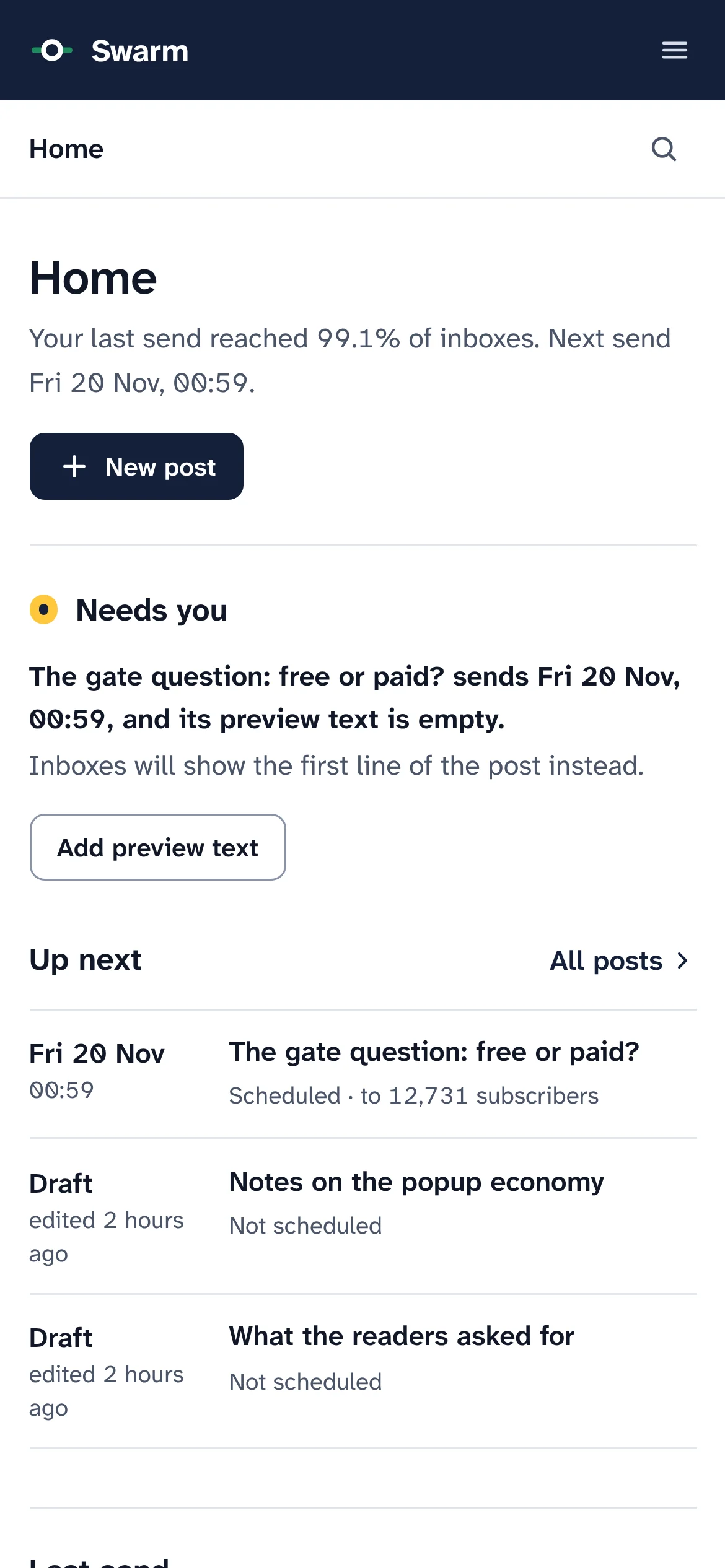
Swarm Home on a phone: the menu folds into a top bar, with the Home title, a New post button and the Needs you list.
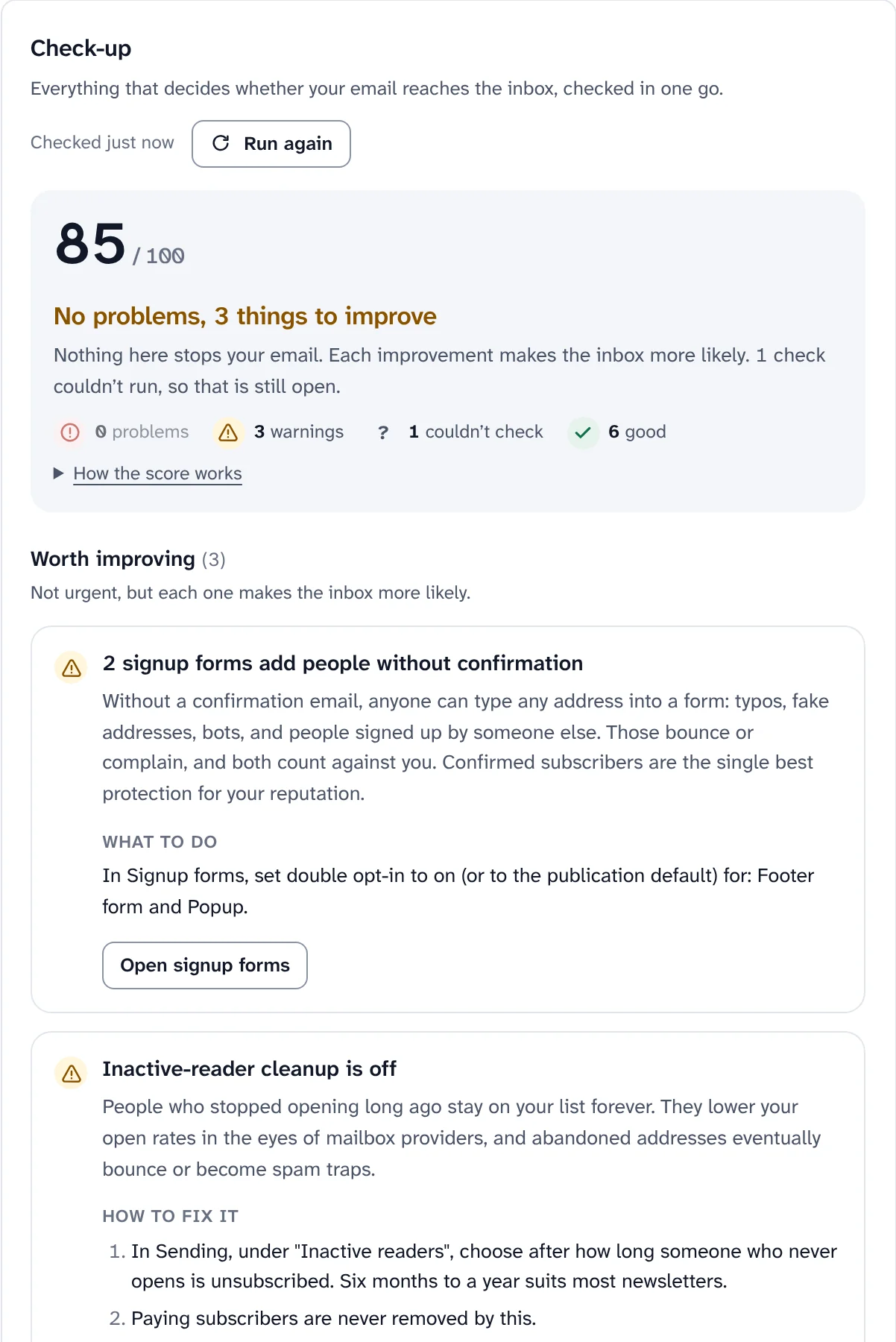
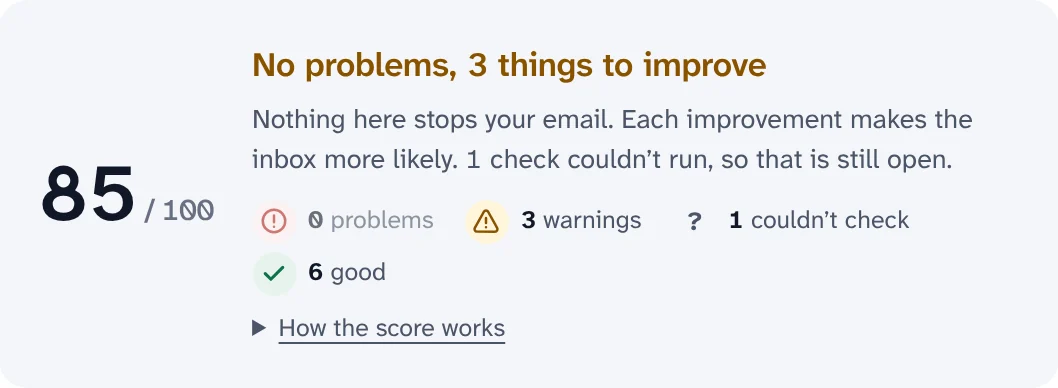
Deliverability check-up The deliverability check-up verdict: 85 out of 100, No problems, 3 things to improve, with 0 problems, 3 warnings, 1 check that could not run and 6 good.
The Swarm dashboard, with sample data.
  • Open source, AGPL-3.0Read every line, change it, run it. No licence fee.
  • Runs on your Cloudflare accountWorkers, D1, R2, KV, Queues and Durable Objects. Nobody else operates it.
  • Any email serviceResend, Amazon SES, Mailgun, Postmark or your own SMTP server.
  • 0% of paid subscriptionsReaders pay you through Stripe. Only Stripe's own fees apply.

The product

Everything a newsletter needs, in one dashboard you run.

Writing, sending, deliverability, your website, your list and your income live together, so a post, its readers and its numbers are always one click apart.

Write

Write once. It reads well in every inbox and on the web.

A block editor made for email and the web, with previews and test sends before anything goes out.

  • Blocks for real posts: images, buttons, quotes, code, embeds, polls, footnotes, a paywall break and reusable snippets.
  • Eight starter templates from the first run, plus your own saved templates and a content calendar.
  • Preview as email on desktop, on a phone and in dark mode, or as a web page, then send yourself a test.
How writing and sending work
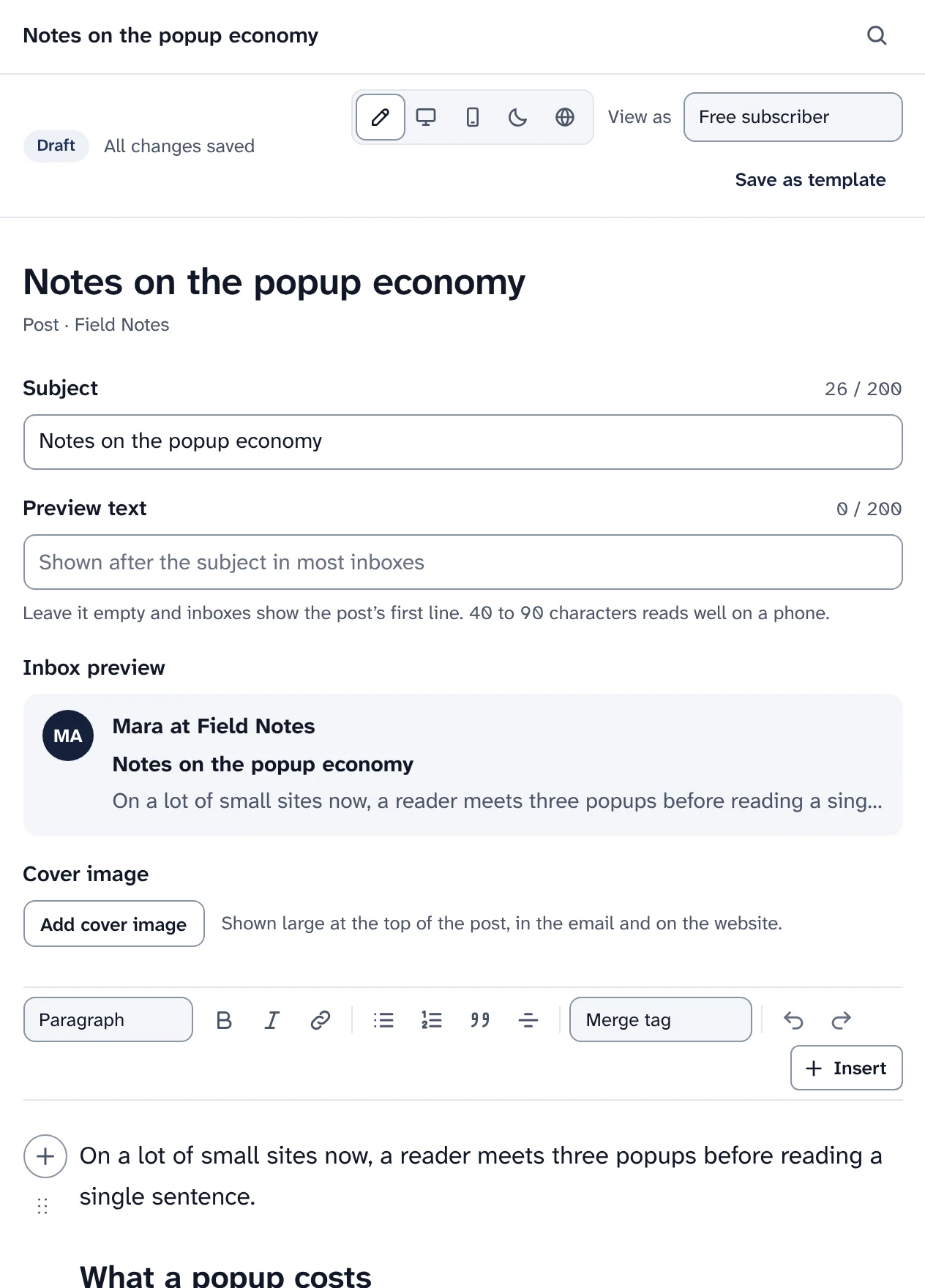
The post editor for Notes on the popup economy: the preview modes Edit, Email desktop, Email mobile, Email dark and Web; Subject and Preview text fields with character counts; an Inbox preview with the sender Mara at Field Notes, the subject and the first line; an Add cover image button; the formatting toolbar with Merge tag and Insert; and the start of the post.
The editor: subject, preview text and how the email shows up in an inbox, above the post itself.

Send

Send now, schedule it, or reach each reader at their best time.

Every send passes the same three stops, and the report updates live while it goes out.

  • Write, Who gets it, Check & send. Choosing everyone is never a silent default, and the checks run before every send.
  • Split tests on the subject or the content, segments, several lists per publication and a resend to people who didn't open.
  • A live send report that counts people, with privacy proxies and link scanners counted apart, plus tracked links and a click map.
How sending works
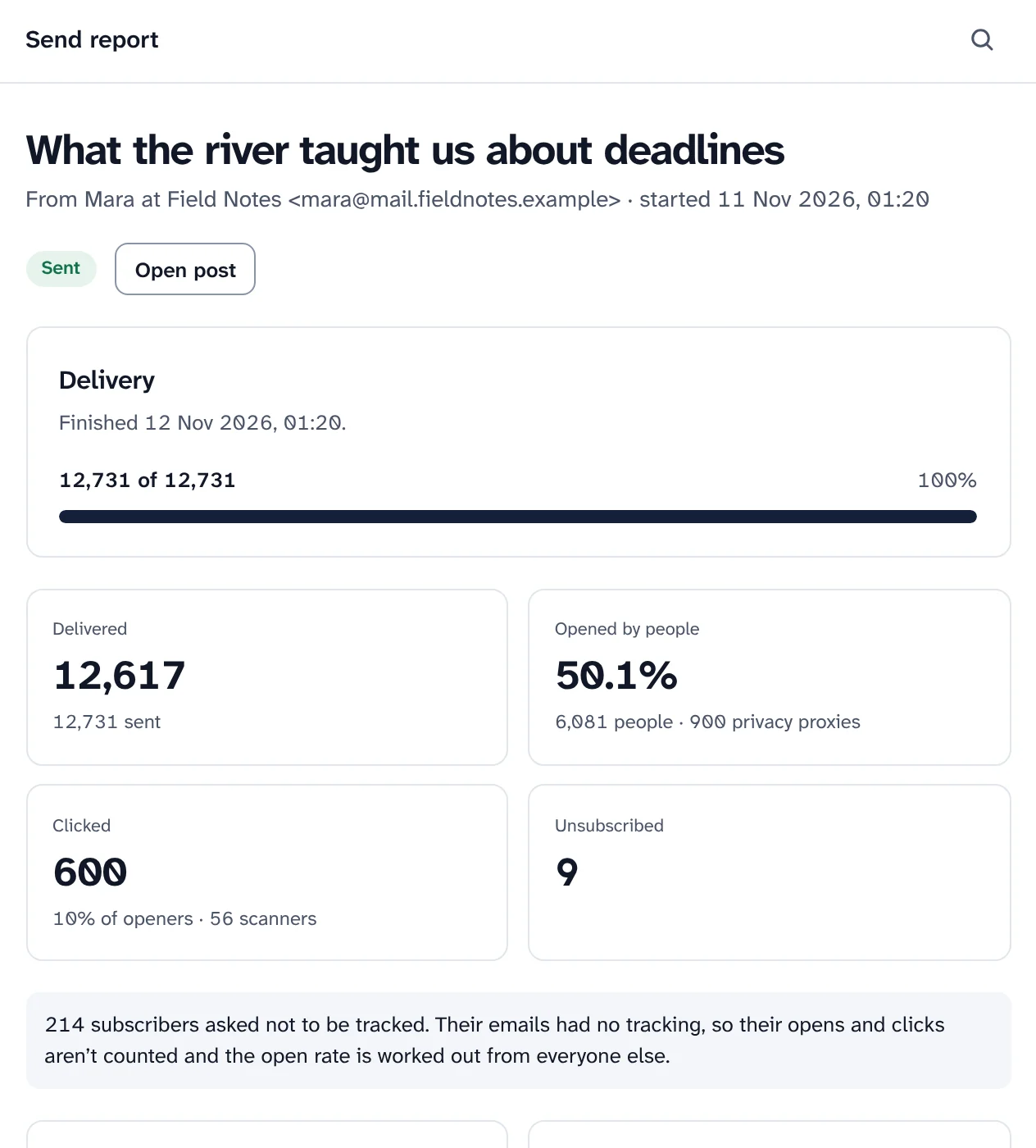
A send report for What the river taught us about deadlines: Delivery finished, 12,731 of 12,731 at 100%. Delivered 12,617 of 12,731 sent; Opened by people 50.1%, 6,081 people and 900 privacy proxies counted apart; Clicked 600, 10% of openers and 56 scanners counted apart; Unsubscribed 9.
Before every send
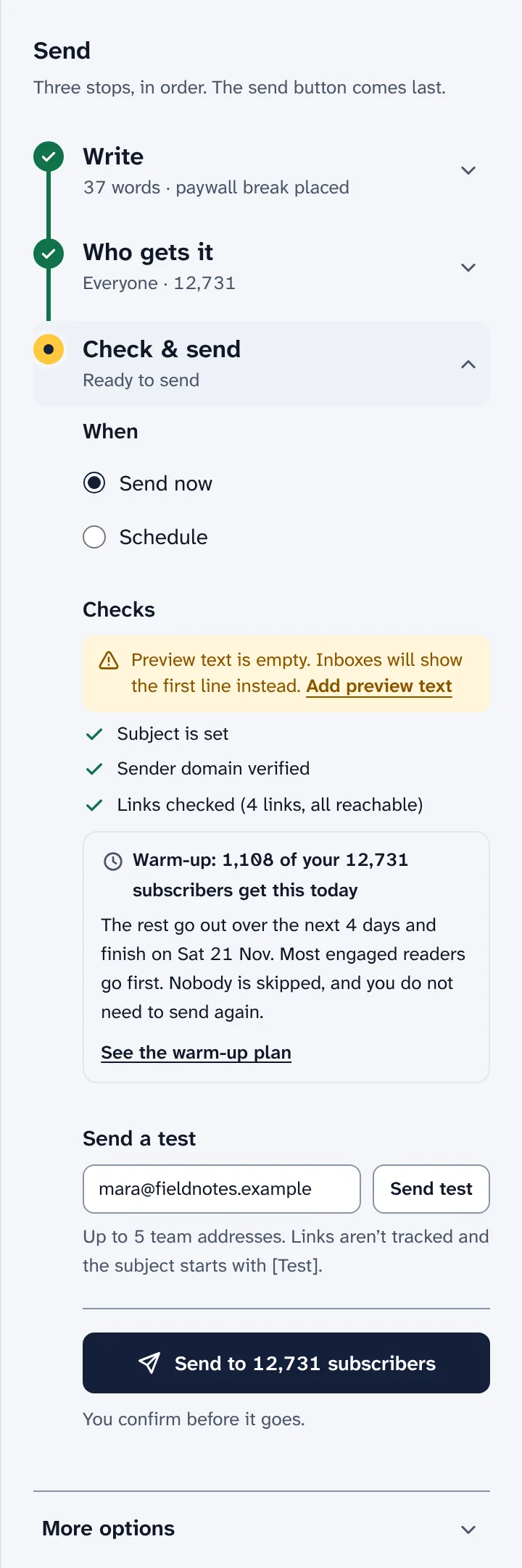
The send panel in the editor: three stops, Write done with 37 words and a paywall break placed, Who gets it done with Everyone, 12,731, and Check and send open with Send now or Schedule and the checks.
A finished send report, and the send panel from the editor.

Reach the inbox

Know why email isn't arriving, and what to fix first.

Swarm checks who you are, how readers react and what your email looks like, and tells you in plain words.

  • A check-up with one verdict and a list of what keeps you out of the inbox, most harmful first, each with the steps to fix it.
  • Warm-up for new domains, with a day-by-day plan and the date your whole list fits in one day. Engaged readers go first.
  • DKIM, SPF and DMARC checked for you, one-click unsubscribe on every newsletter, and DMARC reports collected.
How deliverability works
The deliverability Check-up: a score of 85 out of 100 with the verdict No problems, 3 things to improve; 0 problems, 3 warnings, 1 check that could not run and 6 good. Below, Worth improving: 2 signup forms add people without confirmation, with what it means, what to do and an Open signup forms button.
Warm-up
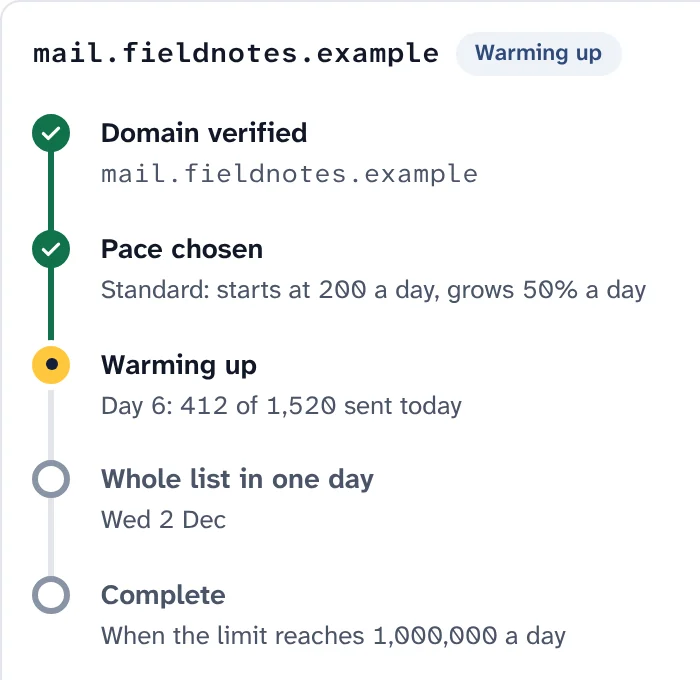
Warm-up for mail.fieldnotes.example, drawn as a route: Domain verified and Pace chosen are done, Warming up is the current stop on day 6 with 412 of 1,520 sent today, then Whole list in one day on Wed 2 Dec, and Complete when the limit reaches 1,000,000 a day.
The check-up, and where a new sending domain stands in its warm-up.

Bounce rules you choose

Hard, soft or blocked, sorted from what the receiving server said. Readers on a paid plan are never stopped silently.

Bounce rules
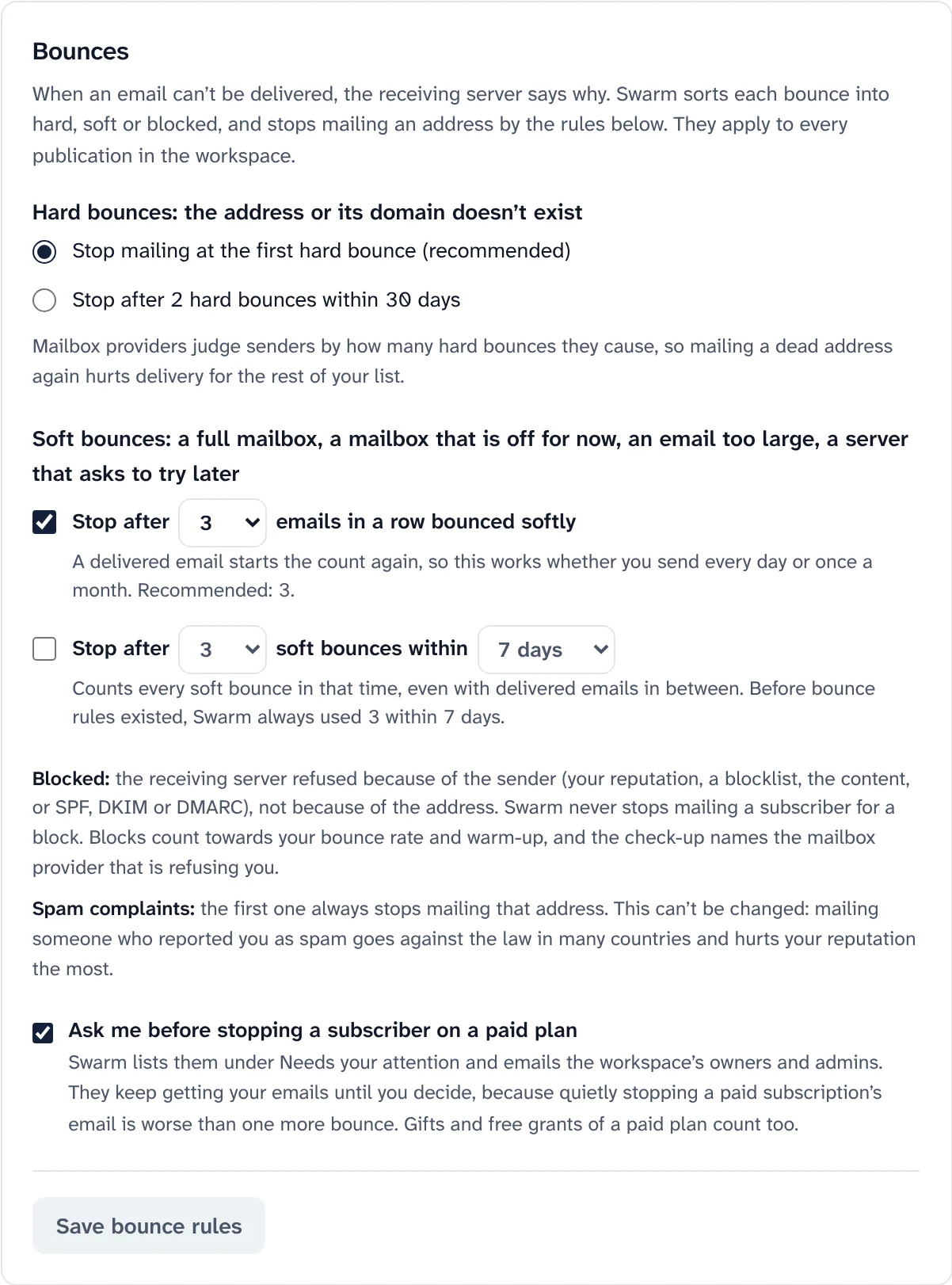
Bounce rules: stop mailing at the first hard bounce (recommended), stop after 3 emails in a row bounced softly, and ask before stopping a subscriber on a paid plan.

Email checks with DeBounce

Check addresses at signup, on import and across your list. Every address gets a green, orange or red check.

How email checks work
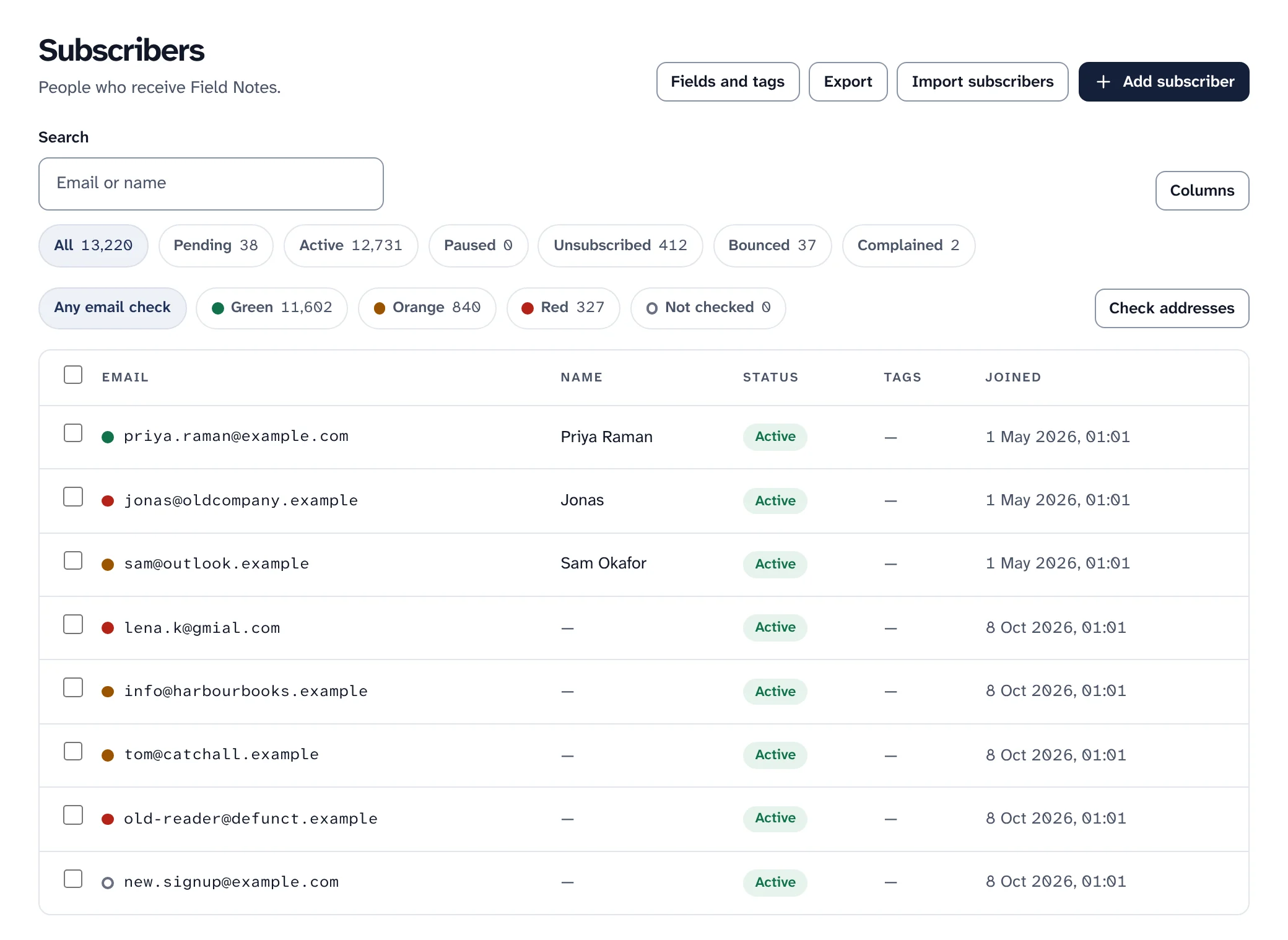
Subscribers with a coloured email check dot beside each address, and filters for Green 11,602, Orange 840, Red 327 and Not checked.

Sending limits, with nothing lost

Set your email service's limits per second, hour, day and month. A send that reaches one waits and carries on by itself, each reader once.

Sending limits
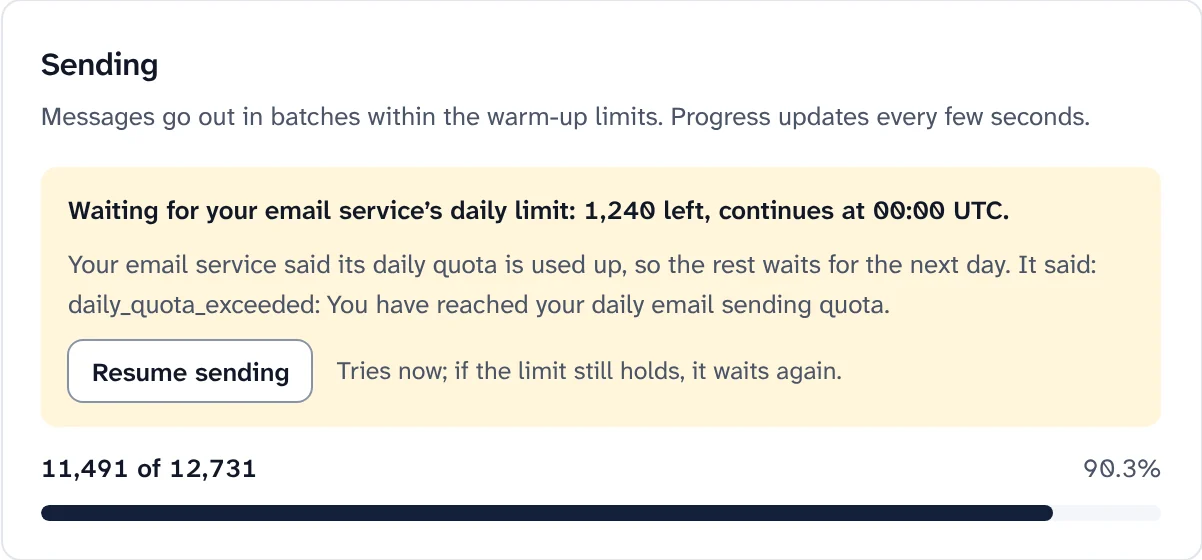
A send report while sending: Waiting for your email service's daily limit, 1,240 left, continues at 00:00 UTC, with a Resume sending button and 11,491 of 12,731 sent.

Your own sending domain

Swarm shows the DKIM, bounce, SPF and DMARC records to add, with a copy button for each, and checks them every few minutes.

Your sending domain
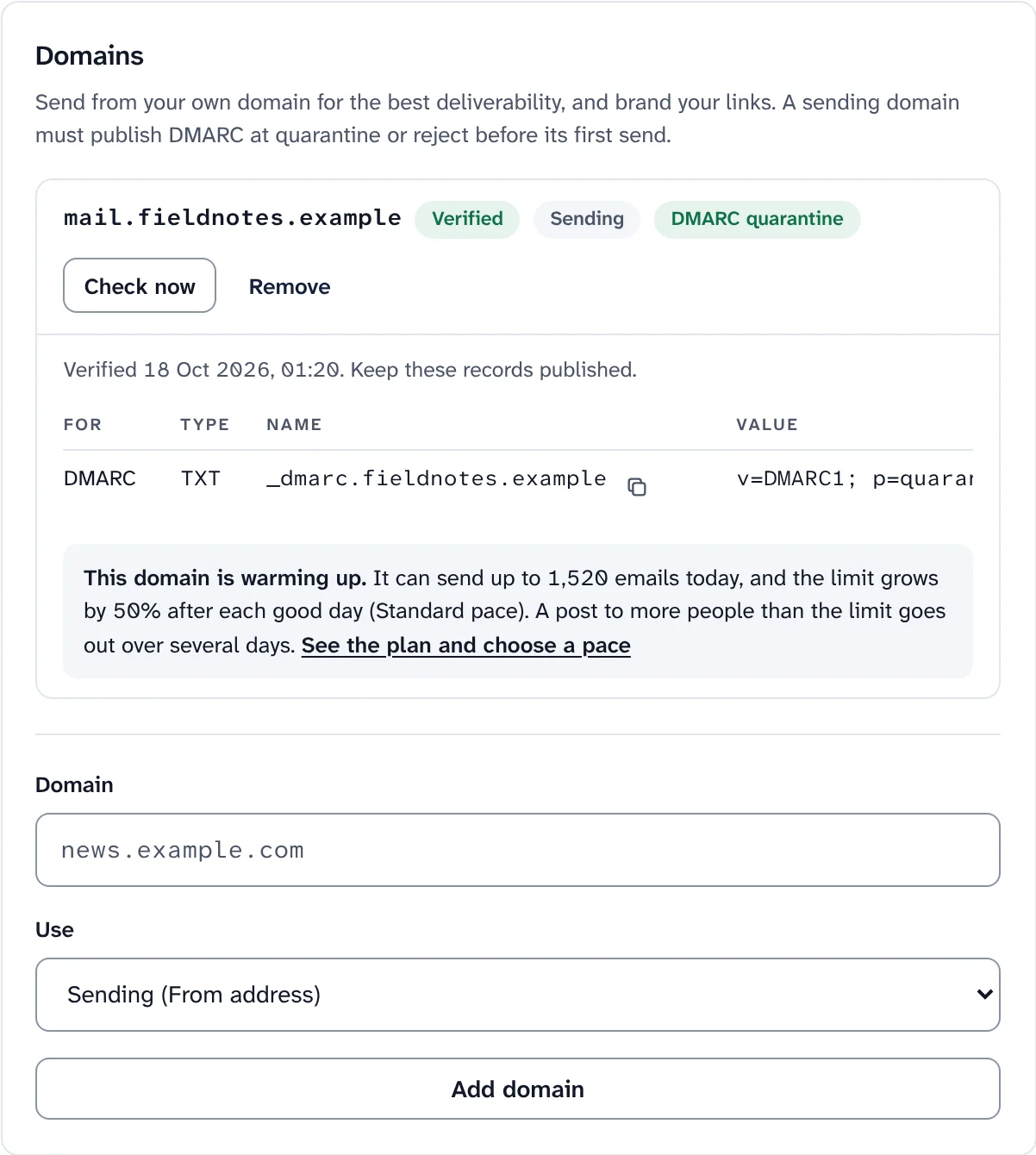
Domains in Sending and delivery: mail.fieldnotes.example, Verified, Sending, DMARC quarantine, with its DMARC record and a note that the domain is warming up.

Grow, earn, publish and protect

Grow

Grow your list with forms, automations and referrals.

Bring people in, welcome them, and keep them reading, without another tool on the side.

  • Signup forms inline, as a slide-in, popup or sticky bar, with confirm opt-in and a page where subscribers manage their own settings.
  • Automations in a visual builder, with recipes for a welcome email, a welcome series, win-back and more.
  • Segments that update themselves, referrals with rewards, polls and surveys, and a link-in-bio page.
How growth works
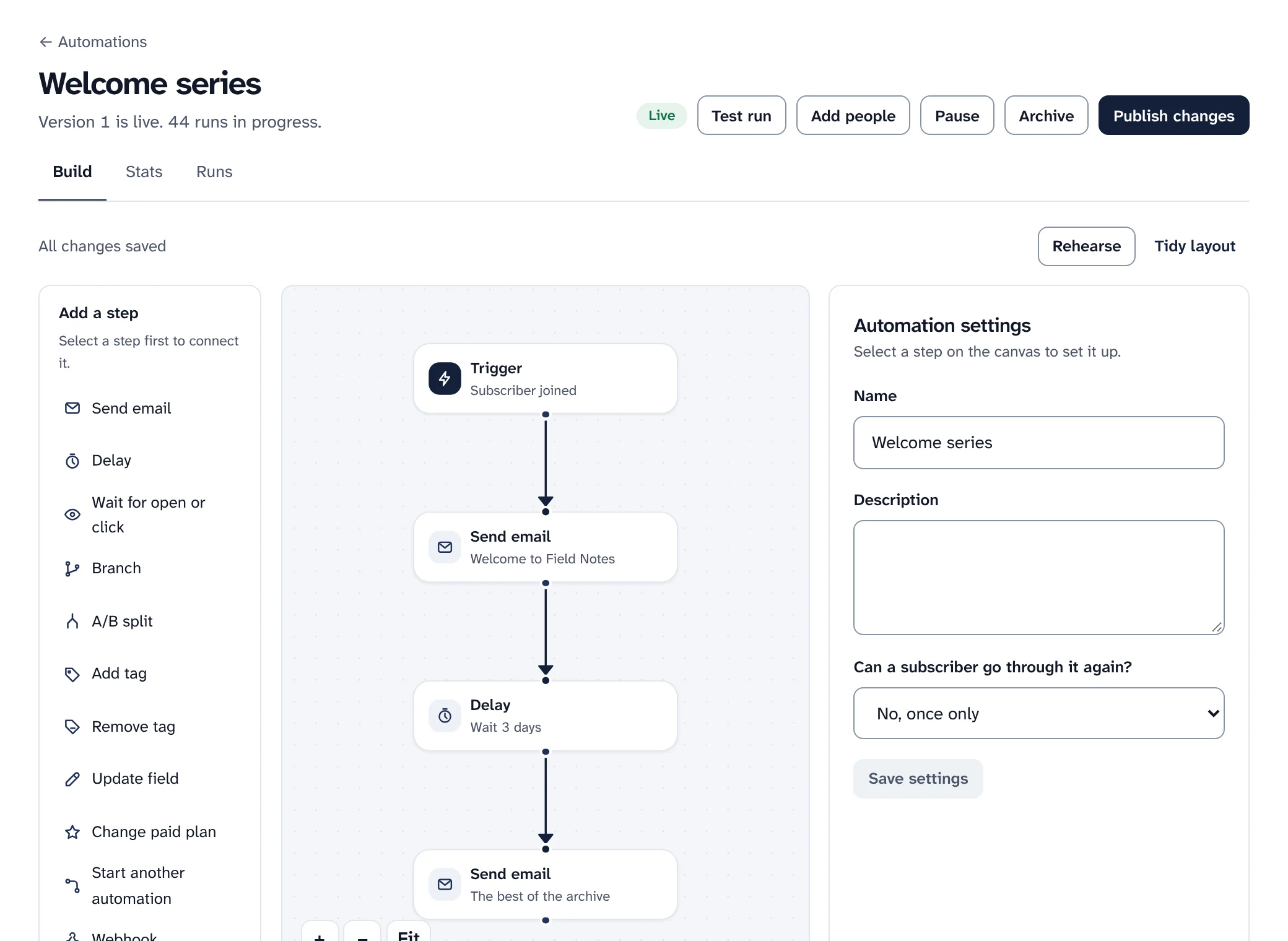
The automation builder for Welcome series, live: a list of steps to add (send email, delay, wait for open or click, branch, A/B split, tags, fields, paid plan, webhook) beside a canvas with Trigger: subscriber joined, Send email: Welcome to Field Notes, Delay: wait 3 days, and Send email: The best of the archive.
Signup form
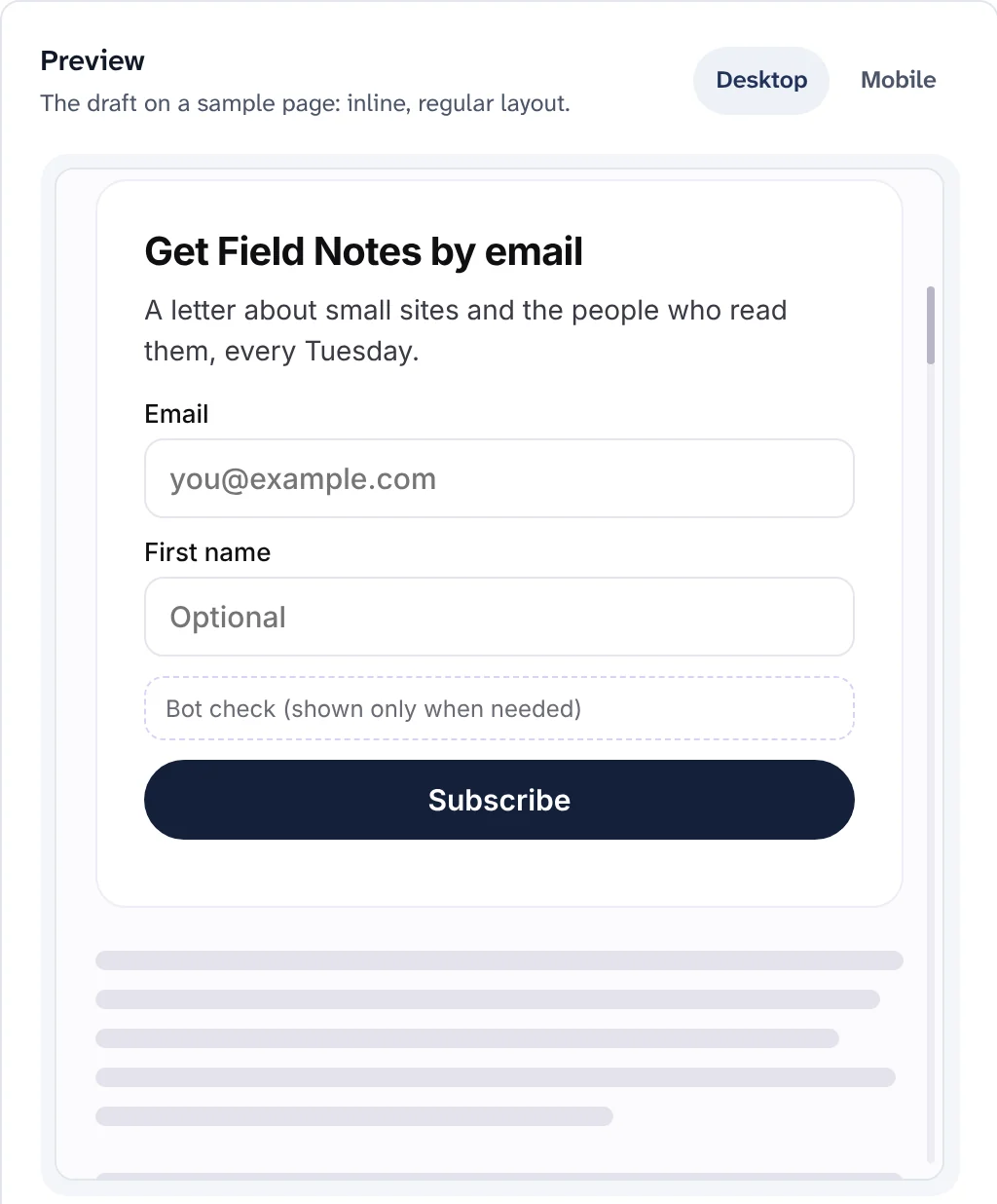
A signup form preview on a sample page: Get Field Notes by email, a line about the newsletter, Email and First name fields and a Subscribe button.
An automation in the visual builder, and a signup form preview.

Earn

Paid subscriptions, with 0% to Swarm.

Readers pay you through your own Stripe account. Swarm takes no share; Stripe charges its own fees.

  • Paid plans with monthly and yearly prices, trials, coupons, gift subscriptions and pay what you want.
  • A paywall break in any post: free subscribers get the top, paying subscribers get everything.
  • A revenue dashboard, and PayPal as a preview for monthly and yearly prices.
Paid subscriptions in detail
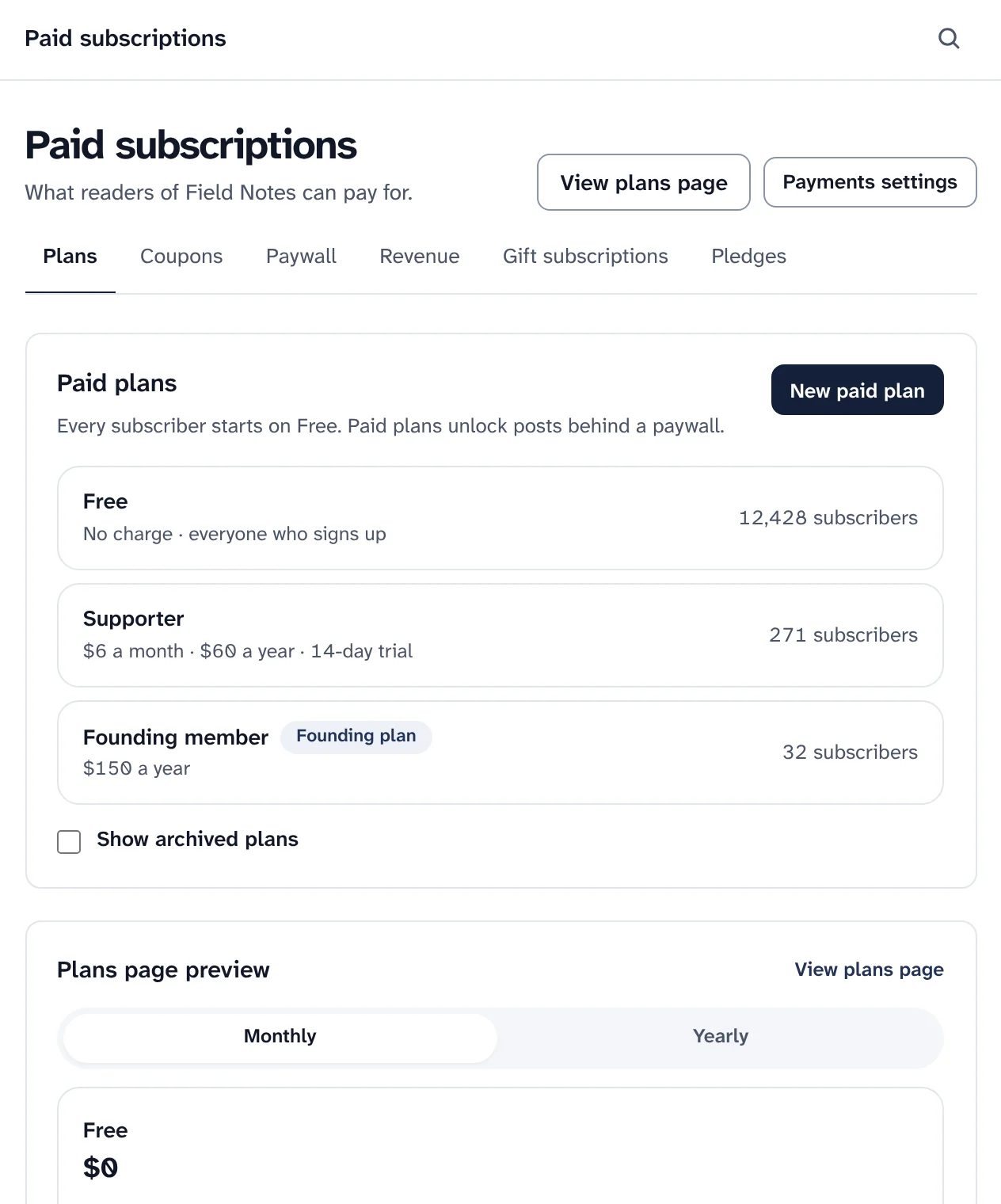
Paid subscriptions, Plans: Free for everyone who signs up with 12,428 subscribers, Supporter at $6 a month or $60 a year with a 14-day trial and 271 subscribers, and Founding member at $150 a year with 32 subscribers, then a preview of the public plans page.
Paid plans and a preview of the public plans page. Prices belong to a sample publication.

Website

A fast website for every publication, on your own domain.

Every publication gets a website the moment it is created. Sent posts appear on it by themselves.

  • Five templates (Gate, Letter, Magazine, Newspaper and Launch) and a plain layout, all built for phones and dark mode.
  • Archive, post pages, sections, search, RSS and JSON feeds, landing pages and custom pages.
  • No third-party scripts unless you add them. Pages render on the server, and fonts and images come from your site.
The website in detail
Website, Template: page layouts drawn small, each with who it suits: Current layout, Gate, Letter, Magazine, Newspaper and Launch.
Choosing a website template. Posts, pages and settings stay as they are.

Privacy

Tracking you can switch off, and history that doesn't last forever.

You decide what Swarm records about readers, and readers can decide for themselves too.

  • Turn off open tracking, click tracking or reader profiles for a publication. Readers can opt out of tracking in their own settings.
  • Choose how long engagement history names a person: 6, 13, 24 or 36 months. Send report numbers stay the same.
  • Subscriber export and erasure, consent records, optional encryption of sensitive fields and cookieless website analytics.
Privacy and GDPR
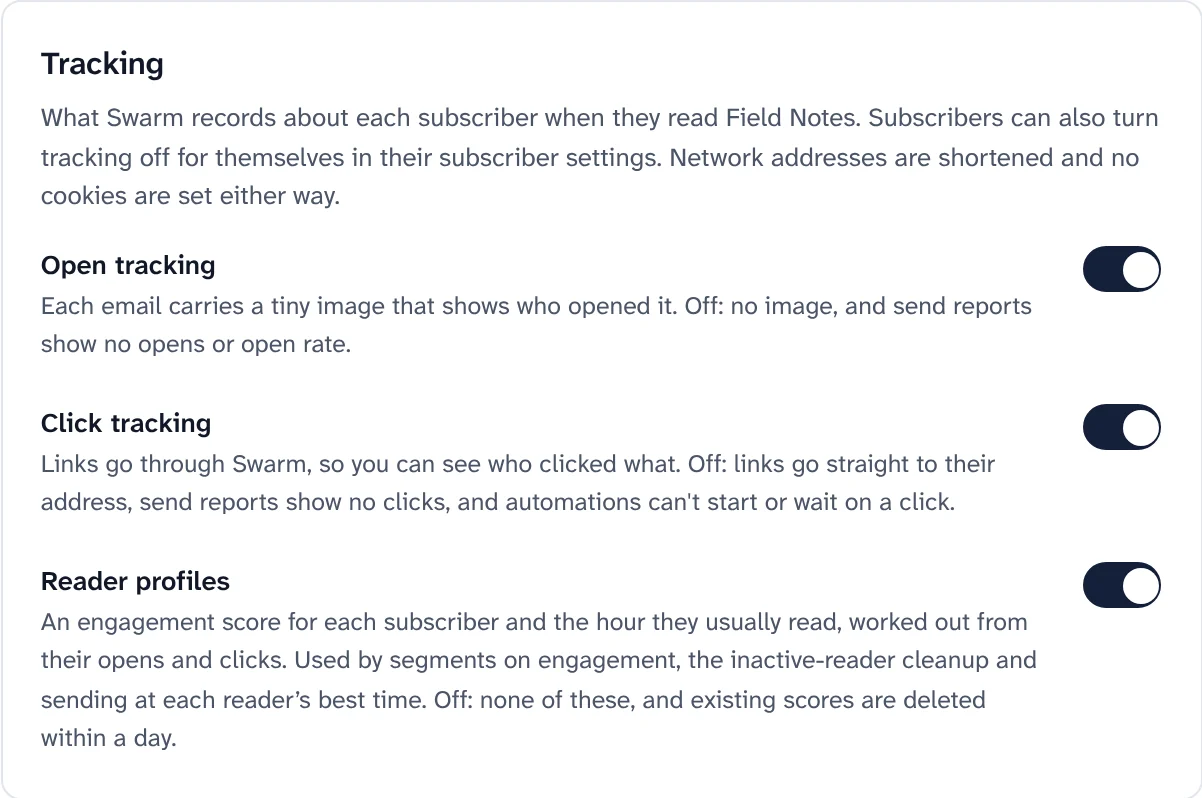
Tracking settings for a publication: switches for Open tracking, Click tracking and Reader profiles, each saying what turning it off changes.
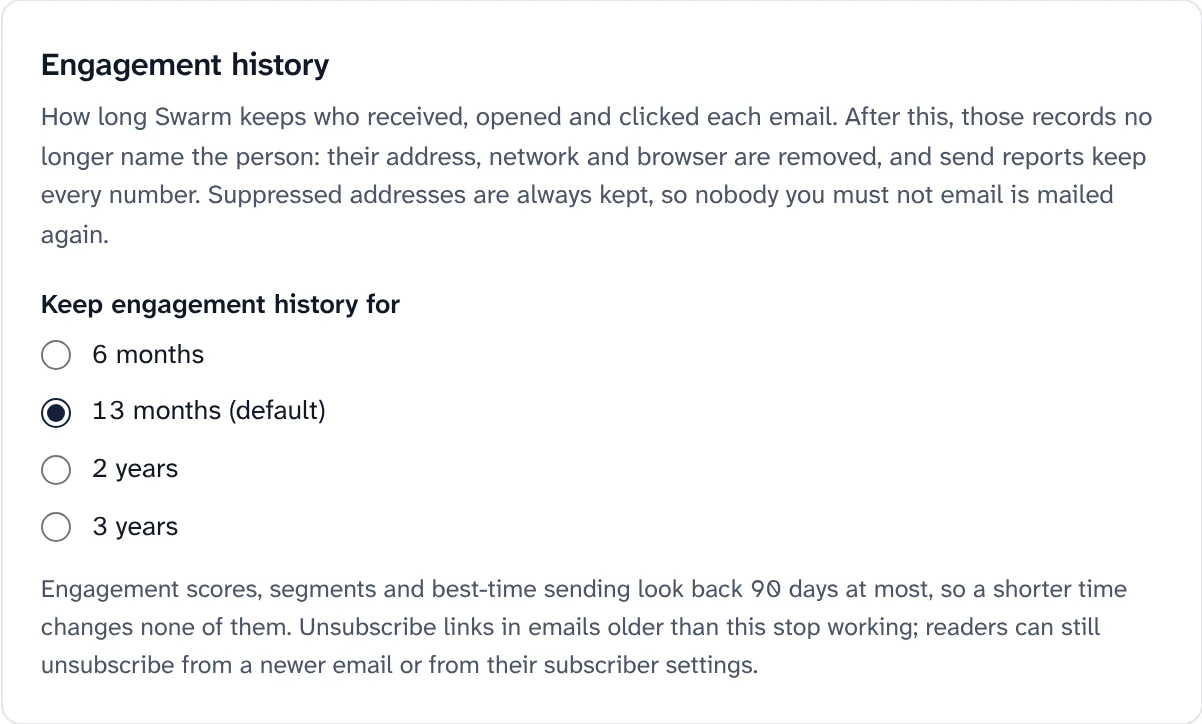
Engagement history in Settings, Privacy: keep engagement history for 6 months, 13 months (the default), 2 years or 3 years. After that, records no longer name the person and send reports keep every number.
Tracking switches for each publication, and how long engagement history names a person.

How it works

From an empty Cloudflare account to your first send.

One installer sets everything up on your account. After that you work in the dashboard, and Home shows you the next step.

  1. Step 1

    Install with one command

    The installer creates the database, storage, queues and DNS records on your Cloudflare account, deploys everything and prints a one-time sign-in link. If it stops, run it again: finished steps are skipped.

    Terminal
    git clone https://github.com/jntegz/swarm-newsletter.git swarm
    cd swarm && pnpm install
    pnpm swarm

    Want to look first? pnpm swarm --dry-run shows every step and changes nothing.

  2. Step 2

    Connect your email service and domain

    The installer asks how to send email. Then add your own sending domain in the dashboard: it shows the DKIM, SPF and DMARC records to add, and checks them for you.

    Choose one:
    ResendAmazon SESMailgunpreviewPostmarkpreviewSMTPpreview
    Check the install
    pnpm swarm doctor
  3. Step 3

    Write and send

    Import your list or add a signup form, write your first post and send it. A first big send from a new domain goes out over a few days by itself, most engaged readers first.

    Home lists four steps until your first send: Sending domain, DMARC set to quarantine, First subscribers and First post. Each has a button to the right page.

Swarm or a hosted platform

The difference is who it belongs to.

A hosted newsletter platform runs everything for you, on its terms. Swarm gives you the same kind of product on your own account, with nothing taken from what you earn.

Swarm compared with a typical hosted newsletter platform
Topic SwarmA typical hosted platform
Who owns the listYou. Subscribers live in a database on your own Cloudflare account.The platform keeps it on its servers, and you work with it through its screens.
Fee on paid subscriptions0%. Payments go to your own Stripe account; Stripe charges its own fees.Often a share of every payment, on top of payment fees.
What you payCloudflare and your email service, directly, at their prices.A monthly plan, usually priced by the size of your list.
Where the data livesYour Cloudflare account: D1 for data, R2 for images and files.Wherever the platform runs.
Deliverability you can seeA check-up, the warm-up plan, bounce rules, DMARC reports and domain health, all on screen.Varies by platform, often with little you can inspect or change.
SendingYour choice of email service, and your own sending domain with DKIM, SPF and DMARC.The platform's own sending setup.
Taking it with youExport subscribers as CSV or JSON Lines with every field, or read the database itself.Usually a CSV of subscribers.
CodeOpen source under AGPL-3.0. Read it, change it, run it.Usually closed.
Running itYours to run: one command to install, one to update, one to check.Nothing to run.

Hosted platforms differ; this compares Swarm with the usual arrangement, not with any one service.

For developers

Build on it. Connect it to the tools you already use.

A public API with a contract you can read, webhooks you can verify, and a way for AI tools to work in a publication with a person in charge.

  • Public API

    Subscribers, segments, posts, sends, signup forms, automations and imports under /v2, with an OpenAPI 3.1 document and a TypeScript SDK.

  • Signed webhooks

    Events for new subscribers, sends and more, signed, retried and logged, with failed deliveries you can send again.

  • MCP server for AI tools

    Connect Claude, Cursor or VS Code. By default, sending a post or deleting subscribers waits for a person to approve it.

  • WordPress plugin

    Show your signup forms on a WordPress site as a block or a shortcode. Addresses go straight to Swarm.

# List your publications with an API key
curl https://app.yourdomain.com/v2/channels \
  -H "Authorization: Bearer sk_live_…"

# The contract, and a reference for every operation
https://app.yourdomain.com/v2/openapi.json
https://app.yourdomain.com/v2/reference

The API and the dashboard use internal names for some things: a post is a Dispatch, a subscriber a Member.

Questions

Good questions to ask before you install.

More answers in the FAQ and troubleshooting guide.

What does Swarm cost?

Swarm is free and open source. You pay the services it runs on, directly:

  • Cloudflare: a plan that includes Queues and Durable Objects (the Workers Paid plan has them), plus any usage beyond what the plan includes.
  • A domain on Cloudflare.
  • Your email service: usually the main cost as your list grows. Resend has a free plan of 100 emails a day; Amazon SES charges per email.
  • Stripe charges its own fees if you sell paid subscriptions. Swarm takes 0%.

Prices change, so check each service. Costs in detail

Is it ready to use?

Swarm is pre-release. Everything described here is built and covered by automated tests, but there is no tagged release yet.

Some parts have only run against stand-ins, not real accounts: the installer beyond --dry-run, Mailgun, Postmark and your own mail server, PayPal, and Stripe with a publication's own key. Large sends have load scripts but no production record yet. The README lists what is tested and what is not, so you can decide where to be careful.

Which email services can I use?

Resend is the quickest to start with, and Amazon SES is the cheapest once you send a lot. Mailgun, Postmark and your own mail server over SMTP are available as previews. With Resend and Amazon SES, bounces and spam complaints come back to Swarm and stop mailing the address.

You can change service later with pnpm swarm mail switch <service>; your current service keeps sending while you move. That has only run against stand-ins so far.

Can I bring my list from another platform?

Yes. Export your active subscribers, then use Import subscribers: map the columns, run a dry run that writes nothing, and import. Rows that bounced, complained, are role addresses or throwaway mailboxes are skipped, and you can check addresses with DeBounce on the way in.

Old posts can go on your website with Import past issues; they are never emailed. Moving paid subscribers depends on your payment provider. A plan that works

Is my data really mine?

Yes. The database, files and settings are in your own Cloudflare account, and nobody else operates it. The services that touch subscriber data on the way are your email service and, if you sell subscriptions, Stripe.

Export subscribers as CSV or JSON Lines at any time, export your templates as HTML, read most things through the API, or export the D1 database with Cloudflare's tools.

Do I need to be a developer?

You need to be comfortable running a few commands in a terminal once: the installer explains each step and asks plain questions. After that, writing, sending and everything else happen in the dashboard. A browser setup page for people who would rather not use a terminal is in preview.

Put your newsletter on your own account.

Install Swarm in one command, keep every subscriber and every payment, and change anything you like.

Install from a terminal
git clone https://github.com/jntegz/swarm-newsletter.git swarm
cd swarm && pnpm install
pnpm swarm

Then follow Getting started from an empty dashboard to your first post in subscribers' inboxes.