Run Swarm on your own Cloudflare account.
Everything runs in your account: eight workers, one database, storage and queues. One command installs it, one checks it and one updates it, and the keys stay with you.
What runs where
Nobody else operates your Swarm. It is eight workers and their storage in your own Cloudflare account, a few services you choose, and a folder of keys on the computer you installed from.
Your Cloudflare account
Every web address is a Worker route on your own domain, such as app., forms. and link., plus one address for each publication website.
swarm-apiThe dashboard, the dashboard's API and the public APIswarm-sendFans a send out to subscribers and hands mail to your email serviceswarm-eventsDelivery, bounce and complaint events, DMARC reports and unsubscribe by emailswarm-trackTracked links, opens and the unsubscribe pagesswarm-captureSignup forms, confirm opt-in and subscriber settingsswarm-sitePublication websites: pages, feeds, the paywall and reader sign-inswarm-jobsImports, exports, segments, automations and webhooksswarm-realtimeLive send reports and sending limits, with Durable Objects
- D1one database
- R2media, imports, exports, reports
- KVcache
- Queuessend, jobs, webhooks
- Durable Objects
- Turnstile
- Email Routing
Services you connect
- Email serviceResend or Amazon SES. Mailgun, Postmark and your own mail server are previews
- StripeIf you sell paid subscriptions. PayPal is a preview
- DeBounceIf you check addresses
- GoogleIf teammates sign in with Google
- AI for CopilotOff at install. Cloudflare Workers AI, or Anthropic if you choose it
The computer you installed from
- The repositoryWhere you run
pnpm swarmand its commands .swarm/Your install's ids, answers and keys. Not in git: back it up
| Address, for the domain example.com | What it is |
|---|---|
app.example.com | The dashboard and the API |
forms.example.com | Signup forms and the pages subscribers manage their settings on |
link.example.com | Click and open tracking |
media.example.com | Images and files |
events.example.com | Delivery events from your email service |
<publication>.example.com | Publication websites |
mail.example.com | The sending domain |
unsubscribe.example.com, dmarc.example.com | Unsubscribe by email, and DMARC reports |
-
Step 1
Check an install with the doctor
pnpm swarm doctorchanges nothing. It checks your install and, for each problem, says how to fix it. It exits with status 1 when it finds one, so it can run as a scheduled job.Add
--env stagingto check a staging install.What the doctor checks
- Configs and resources: the worker configs match what the installer would write now, every Cloudflare resource exists and every worker has its secrets.
- Database and health: no migrations are waiting, and every address answers and reports the right environment.
- Mail: the DKIM, return-path and DMARC records resolve, DMARC is quarantine or stricter, your email service calls the domain verified, and whether Amazon SES is still in its sandbox.
- Accounts: the owner exists, which sign-up mode is on, and, with DeBounce, how many credits are left.
-
Step 2
Update with one command
pnpm swarm updateasks no questions. Your settings stay, and the features you turned off stay off: an update only fills in features that have no setting yet. Read the changelog first for anything that needs a step by hand.A clone with commits of its own stops the pull. Pull or rebase yourself, then run it again.
What an update does, in order
- Pulls the latest version and installs its dependencies, exactly as locked.
- Creates any new resources on your account and writes the worker configs.
- Applies database migrations, forward only.
- Fills in new features, on or off as each one starts.
- Builds the dashboard and deploys every worker, the realtime worker first and the API last.
- Checks that every address is healthy.
-
Step 3
Turn features on and off for the whole install
Parts of Swarm can be switched on or off for everyone using your install, in Settings, Instance, Features, or with
pnpm swarm feature. Both change the same setting, and a change reaches every worker within a minute.- On after an install: most features, from split tests and Link Hub to gift subscriptions and email checks.
- Off until you choose: Copilot, which uses a paid AI service; keeping where subscribers came from; single sign-on; and Products.
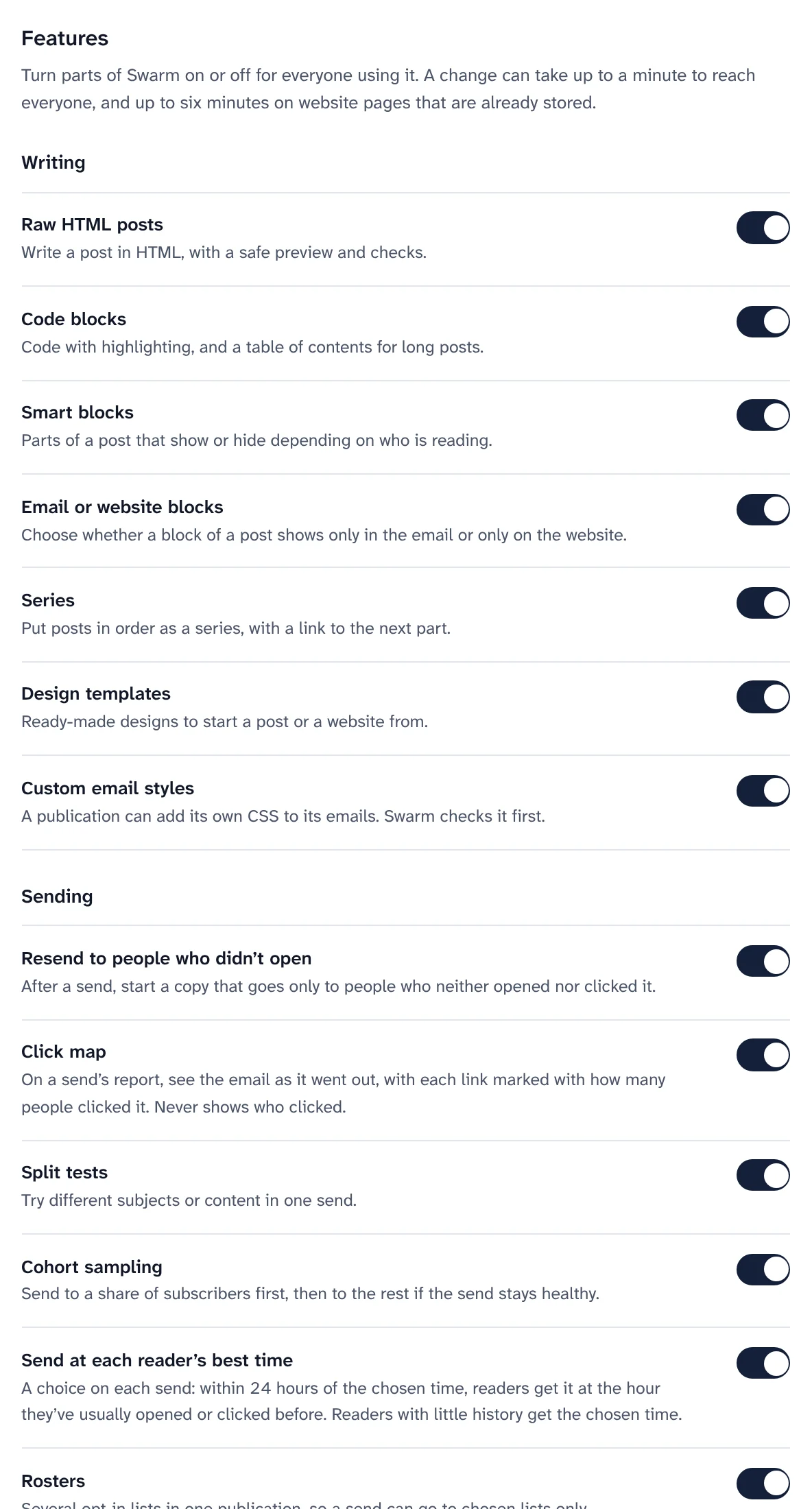
The switches for the whole install. -
Step 4
Connect your email service, and keep to its limits
The installer connects Resend or Amazon SES, and Settings, Instance shows what the service needs: each DNS record and what DNS really has, whether bounce and complaint reports are arriving, and for Amazon SES the sandbox and your sending limits. Set your plan's limits under Sending limits, and nothing is lost when a send reaches one.
Change service later with
pnpm swarm mail switch <service>: your current service keeps sending while each publication publishes its new records. It has only run against stand-ins so far.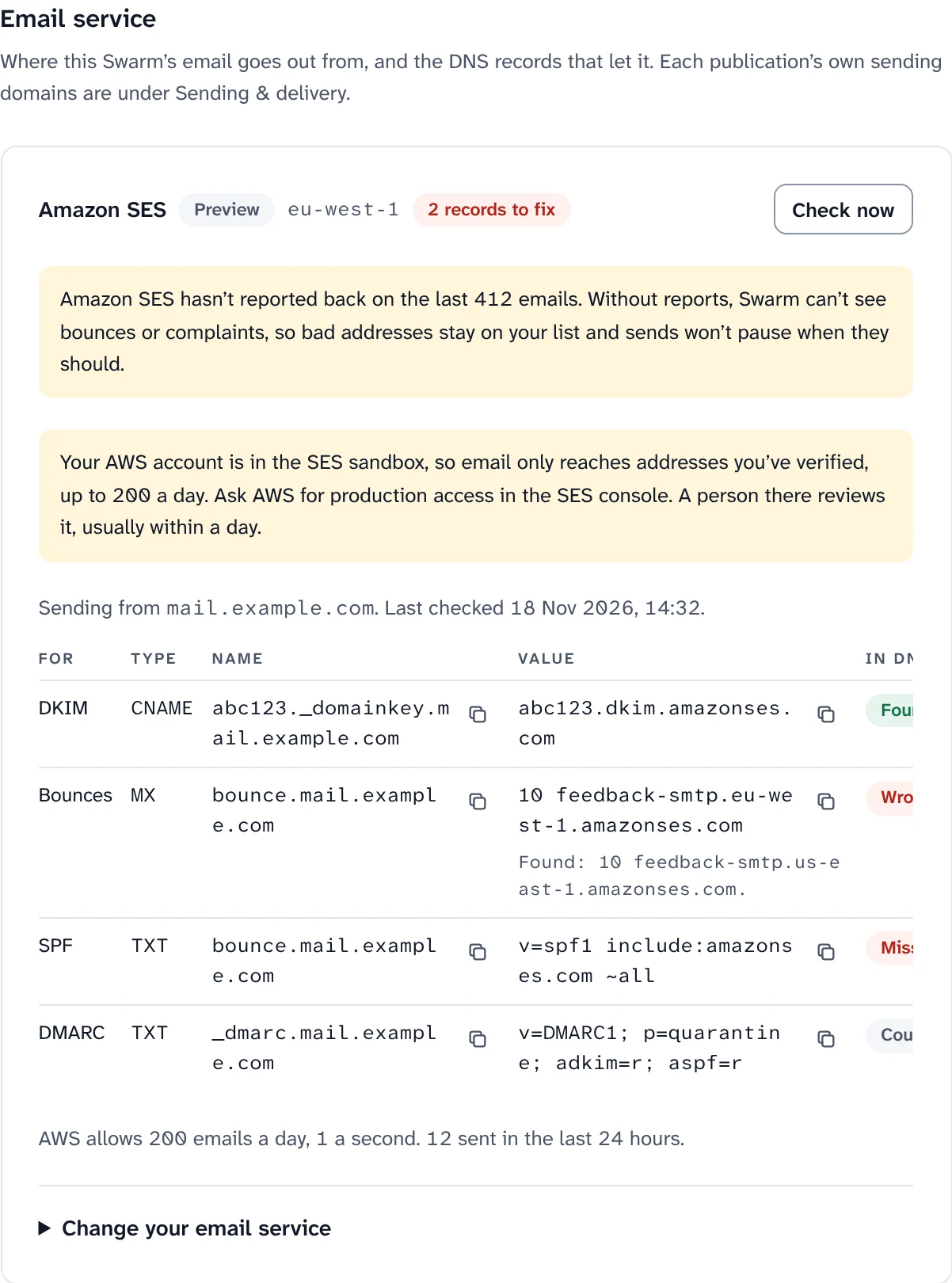
The email service as Swarm sees it, before production access. Sample data. Resend or Amazon SES Resend Amazon SES Getting started One API key, and the domain often verifies within minutes Needs an AWS account; new accounts start in the sandbox Free use 100 emails a day and 3,000 a month on the free plan You pay per email, apart from any AWS free allowance At volume Paid plans by monthly volume The cheapest option once you send a lot Dedicated sending Not available Configuration sets and dedicated IPs per publication -
Step 5
Turn things on later
Payments, Google sign-in, custom domains for publications and email checks are optional. Turn each one on when you need it, from the computer you installed from: the installer asks for what it needs and redeploys the workers that use it.
enable custom-domainslets publications use their own domains, with Cloudflare for SaaS.enable paymentssets up Stripe Connect. Or skip it: an owner can add a restricted Stripe key in Settings.enable googleandenable debounceadd Google sign-in and email checks.
Lost your sign-in?
pnpm swarm signin-linkmakes a new one-time link for the owner. -
Step 6
Back up what only you have
Most of your install can be made again; three things can't. Keep a copy of each somewhere safe and private.
- The
.swarm/folder. It holds the keys of your install. Without it you can't update, and if the key calledFIELD_KEYSis lost, encrypted subscriber fields can never be read again. Copy it again after eachenable. - Your subscribers. Export them now and then, or let an export destination copy them to storage of your own on a schedule.
- The database. It is one Cloudflare D1 database in your account, which Cloudflare can restore to an earlier point in time. Images and files are in R2 in the same account.
Swarm has no backup command of its own. Use Cloudflare's tools for the D1 database, keep
.swarm/in a password manager or on an encrypted disk, and test that you can restore it on another computer.To run the commands from another computer, clone the repository there and copy
.swarm/into it. - The
-
Step 7
A staging install, and removing Swarm
pnpm swarm --env stagingmakes a second, separate install on the same domain, with its own resources, workers and keys, at addresses that start withstaging-. It has no publication websites, because the wildcard address belongs to production. Every command takes--env staging.There is no uninstall command. The self-hosting guide lists every worker, resource, record and key to delete by hand. Export what you want to keep first: deleting the database deletes all your data.
What it costs to run
Swarm is free and open source, and takes no share of what readers pay you. You pay the services it runs on, directly. Prices change, so check each one before you rely on a number here.
- Swarm: freeOpen source under AGPL-3.0, with 0% of paid subscriptions.
- CloudflareA plan that includes Queues and Durable Objects, such as Workers Paid, plus any usage beyond what it includes.
- A domainOn Cloudflare, with its nameservers pointing there.
- Your email serviceUsually the main cost as your list grows. The send report estimates Amazon SES at $0.10 per 1,000 emails.
- Stripe, if you sellStripe's own fees on each payment. Swarm adds nothing.
- Copilot, if you turn it onIt runs on Cloudflare Workers AI and bills to your Cloudflare account, unless a workspace brings its own key.
Where the project stands
Swarm is pre-release. Everything on this page is built and covered by automated tests, but there is no tagged release yet.
- Tested on every change: the whole product against local Cloudflare runtimes, with the email service, Stripe and Cloudflare's API replaced by stand-ins.
- Not yet run against real accounts: the installer beyond
--dry-run, the browser setup page, Mailgun, Postmark and your own mail server, changing email service, PayPal, and single sign-on. - Not yet proven at volume: large sends and a 50,000-subscriber import have load scripts, but no production record yet.
If you install it, please open an issue with what worked and what didn't. That is the fastest way for these lists to shrink.
Keep reading
Yours to run, from the first command.
Install Swarm on your Cloudflare account, then check it with the doctor and keep it current with one update command.
Want to look first? pnpm swarm --dry-run shows every step and changes nothing.